A practical guide for brands from the graphics team at Belmark.
Most of the brands we work with are experts at something other than graphic design. You know exactly how your jerky should taste, how your supplement should be dosed, and how your salsa should hit. Artwork files, color separations, and dielines were never supposed to be your job — and now there’s a tool that promises to handle all of it in about four minutes.
So of course brands are using it. We’re seeing AI show up in artwork every week now, from first-time founders and from experienced design firms alike. Some of it works beautifully. Some of it stops the job cold.
Here’s the honest version, from a printer that produces pressure sensitive labels, flexible packaging, and folding cartons every day: AI is a genuinely useful packaging design tool, but AI output is not automatically production-ready artwork. Those are two different things, and knowing the difference is what keeps your launch on schedule.
What “AI packaging design” actually means
When brands say they “used AI” on their packaging, they usually mean one of three things, and each one lands very differently at a printer.
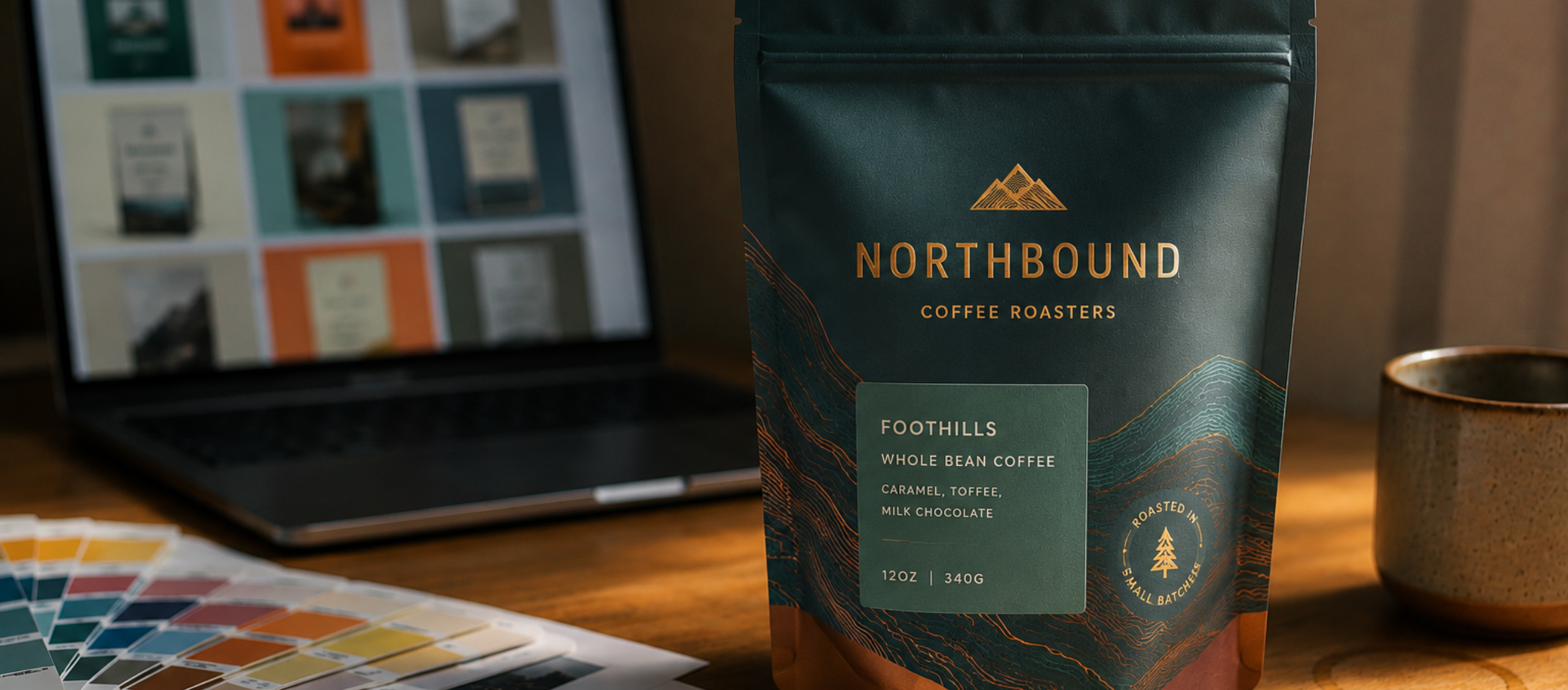
The first is image generation — using Midjourney, Adobe Firefly, ChatGPT, Ideogram, or Gemini to create backgrounds, illustrations, product imagery, or full label concepts. The second is copywriting — drafting product names, taglines, and on-pack story copy. The third is AI-assisted editing inside real design software, like generative fill or generative recolor in Illustrator and Photoshop.
That third category is closest to production, because a designer is still building the file. The first category is where the confusion lives, because an AI image generator can produce something that looks exactly like a finished package — and looking finished and being finished aren’t the same thing.
Which raises the fair question: if AI isn’t building your final file, what is it actually good for?
Where AI genuinely saves you time
It saves quite a bit, actually. We’ve printed a lot of packaging that had AI somewhere in the design chain, and we’ve seen it handle work that used to take a designer days.
Concept exploration. This is the big one. Coming up with distinct visual directions for a new product used to take a designer twenty to forty hours. A brand can now generate fifty directions in an afternoon and use them to figure out what they actually want before anyone starts building a production file. It has genuinely changed how brands develop packaging.
New angles on product photography you already own. Say you shot your fruit snacks and you love the cherry, apple, and blueberry images — but the grape shot didn’t capture the right angle. Feeding AI the images you already have and asking for a new angle is a legitimate use, and a designer can drop that result into the real artwork.
Backgrounds, textures, and illustrations. Individual design elements are much easier to bring into a production file than a whole flattened package. Generate the background, keep it separate, hand it to your designer.
Flags and violators. Those small on-pack callouts — “New,” “Gluten Free,” “Now 20% More” — are quick to generate as standalone elements during a brand refresh.
First-pass copy and translation. Marketing copy, product descriptions, and export-market translation all benefit from an AI draft, as long as a human reviews it before it goes on a package.
Notice what all five have in common. In every one of them, AI is producing an ingredient rather than the finished file, and that’s the pattern that consistently holds up in production.
Printable vs. production-ready: the distinction that matters most
Here’s the idea that clears up most of the confusion, and it’s worth borrowing for your own conversations.
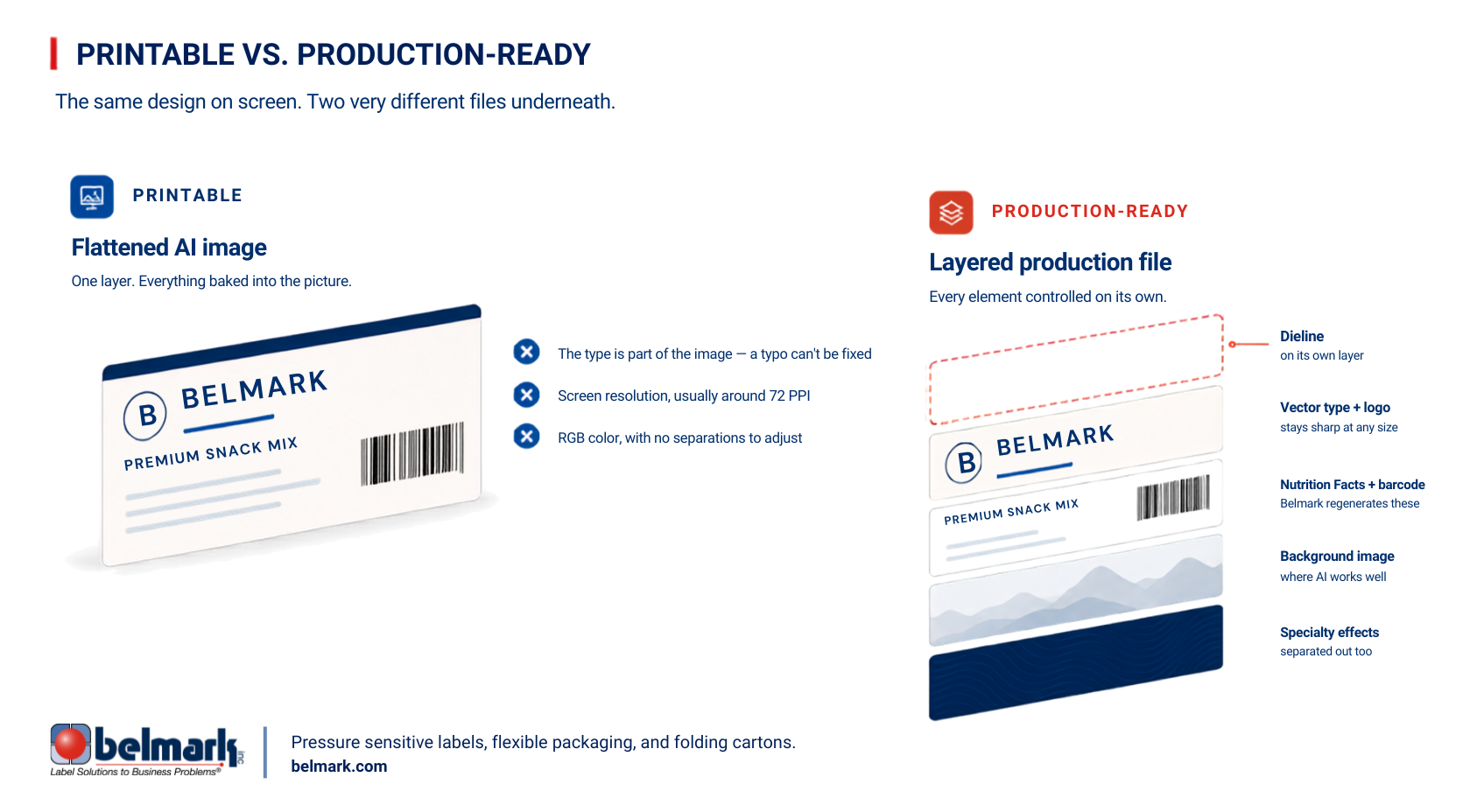
A printable file is one a device can output. Your office printer, a copy shop, or a digital mockup can take an AI-generated image and put it on paper. Nothing has to be converted, so nothing breaks.
A production-ready packaging file is something else entirely. It’s built for a specific press, a specific material, and a specific converting process. A lot has to be true underneath the design that you can’t see by looking at it. The resolution has to hold up at print size, the color has to be built in the right space, type and logos have to be vector, and the dieline has to live on its own layer. There’s more under that — bleeds, minimum type sizes, how the colors separate — but that’s the shape of it, and it’s our job to know it, not yours.
Most AI output is one flattened image. For a photograph or a background element, that’s completely fine. It becomes a problem when the entire package — logo, product name, ingredient statement, Nutrition Facts panel, barcode, legal copy — is baked into that same single image. Those elements have to be controlled and reproduced very differently than a background.
Two technical realities drive most of it:
Resolution. AI tools commonly output around 72 PPI, which is a screen resolution. It looks great on your monitor. Belmark considers anything under 266 PPI low resolution for production, and our platemaking process images at far higher detail than that. We can enlarge a low-resolution image, but we can’t add detail that was never captured. On press, that shows up as soft, smudgy edges instead of crisp ones.
Raster vs. vector. Raster artwork is made of pixels, like a photograph. Vector artwork is made of mathematical points, which means it can scale from a jar label to a billboard and hold a clean, sharp edge the whole way up. AI generates raster. Type, logos, and hard-edged graphics all want to be vector, because that’s what reproduces sharply when it transfers to a plate.
None of that means your AI concept is wasted. It means there’s a build step between the concept and the press — and that step is where a lot of the value in packaging design has always lived.
Why AI struggles with text on a package
If we had to name the single biggest issue with AI artwork in packaging, it’s type.
AI text looks correct at a glance and often isn’t. Open the file and you’ll find letters squeezed together, small artifacts inside characters, and edges that go soft the moment they hit a plate. And because the text is part of a flattened image, it can’t be edited — you can’t fix a typo or bump a size without regenerating the whole thing and hoping it comes back better.
Then there’s the accuracy problem, which matters far more on a package than on a social post. If your prompt is slightly off, AI will confidently render 7% where you meant 11%. On a marketing graphic, that’s an annoyance. On an ingredient statement, an allergen declaration, a Nutrition Facts panel, or a claim, it’s a regulatory issue.
Here’s the reassuring part: Belmark regenerates Nutrition Facts panels and barcodes as a standard part of our process, whether or not AI was involved. We have people whose job it is to rebuild those elements, and we verify barcodes for scan quality before anything runs. So that piece is already handled for you.
What we can’t do is guess. When regulatory copy or critical text is locked inside a flattened image, we won’t assume what you meant — we’ll ask. Color is the other place this comes up, and it surprises people for a completely different reason.
Why screen color isn’t press color
Color expectations are where you’re most likely to be caught off guard, and this one predates AI by about forty years.
AI generates in RGB, the color space your monitor uses — red, green, and blue light mixed to create an image. Printing uses ink on a material. When an RGB image converts to a printed color space, colors almost always come back a little quieter than they looked backlit on your laptop. Bright, saturated, screen-glowing artwork can land flatter than you expected.
The material matters just as much. The same artwork prints differently on a clear film than on a white film, and differently again on a metallized one. What your package is made of drives what the color does.
This is where a printer earns its keep. When we receive layered production artwork, we adjust the color separations ourselves to get as close as we can to what you had in mind on that particular material. When we receive a single flattened AI image, there’s much less for us to work with, because those adjustments have to be made element by element.
If consistent color across your line matters to you, that’s worth a conversation before artwork is built, not after.
What happens when AI artwork arrives at a printer
Our graphics coordinators review every incoming file, and AI-generated artwork usually announces itself early. When it does, the first step is always the same: we reach out to you.
That conversation is the part you probably didn’t plan for. You used AI to move faster, and now there’s a stop sign in your timeline. Depending on the file, the path forward is one of these:
- Belmark rebuilds elements of it. If the file is simple, we can retypeset the copy and regenerate the Nutrition Facts panel and barcode, usually in about a day.
- Your designer rebuilds it. More complex artwork goes back for a proper production build. That can take a week.
- You bring in a designer. If you don’t have one, we’ll point you to designers we’ve worked with who already know how we build files.
A related issue shows up with templates. AI will sometimes alter a dieline in a way that isn’t obvious until someone opens the file and starts working with it — and by then the artwork needs correcting rather than simply moving forward.
We’d rather help you avoid that stop sign altogether. It’s also worth saying that not every job hits it. A decorative front panel on a wine label with no legal copy on it is a very different situation than a full folding carton with a Nutrition Facts panel and a barcode. Design drives most of what happens in print.
So what does a smooth version look like?
The workflow that actually works
This is the sequence we’d recommend to any brand using AI in packaging design:
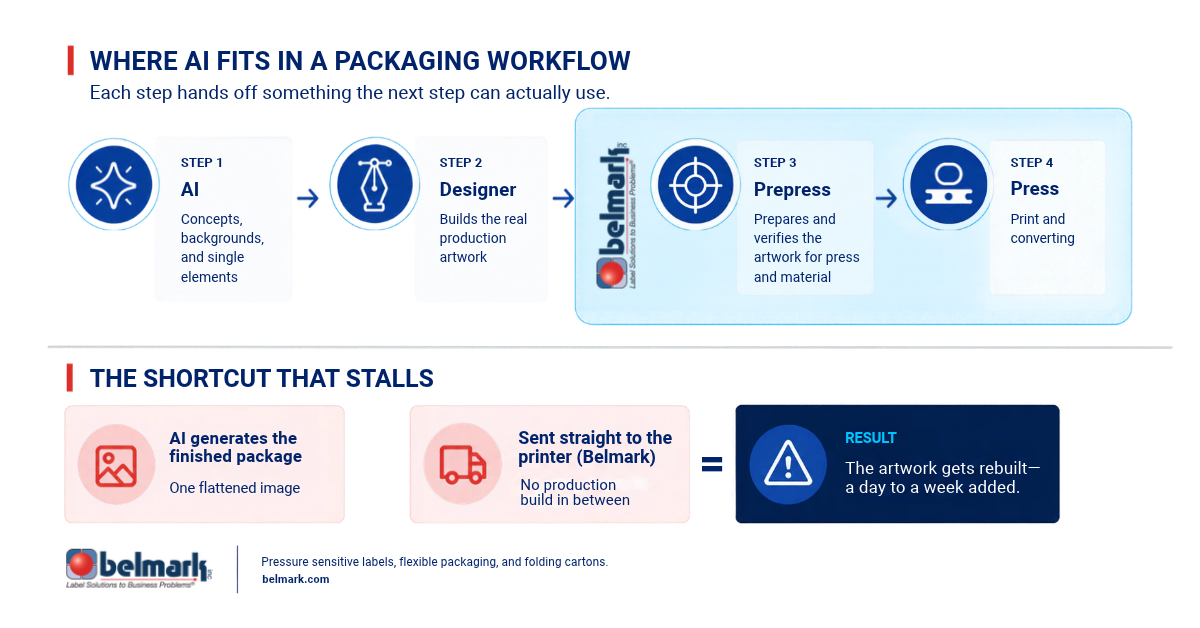
AI for concepts and individual elements → a designer builds the real production artwork → prepress prepares and verifies it for the specific press and material → print and converting.
What doesn’t work is: AI creates the package → send it to the printer.
A few things that make the first version go smoothly:
- Lock your brand system before you prompt. Colors, typography, and logo treatment should be human-decided. AI riffs inside that system well; it doesn’t define it.
- Keep your elements separate. Ask AI for the background on its own and the graphic elements on their own. Handing a designer clean, separated assets saves real time.
- Never let AI write your regulatory copy. Ingredients, allergens, Nutrition Facts, claims, directions — those come from you and your QA process.
- Bring us in early. Before your designer builds the final file, a packaging expert can tell you what will reproduce well at your actual package size and on your actual material. That one call prevents most rebuilds.
- Use concept samples the right way. Physical prototypes are great for photo shoots, tradeshows, retailer meetings, and investor presentations — and an AI concept can absolutely feed one. Prototypes aren’t food-safe or shelf-ready, so they’re for showing, not for filling.
All of that assumes you have someone to do the build, and for a lot of earlier-stage brands, that’s the actual sticking point.
What to do if you don’t have a designer
This is the question we get most often, and “hire a design firm” isn’t always a realistic answer. There’s a middle path.
Use AI for the images, not the text. Generate your background, get the product angle you’re missing, and keep the foreground separate so you end up with usable pieces. Then bring in help for the build — and that help is easier to find than most brands expect. Design students and freelancers building portfolios can turn an AI concept into a real production file in a day or two.
You can also just be direct with us. Plenty of customers tell us, “Here’s my layout, here’s my background image, here’s the copy — I don’t care what font you use, as long as it reads like this.” We can work with that.
You don’t have to know how to do all of this. You do have to know where the handoff is, and that’s what we’re here for. Belmark works with the files you provide and gets them ready for production, and we’ll tell you straight what a file needs well before a deadline is at stake. Before you start generating, though, there’s one more thing worth thinking through.
Ownership, copyright, and what you upload
There are two things worth flagging here, and on both of them we’d point you to your own legal counsel.
Copyright around AI-generated content is still evolving, and we’re careful not to make claims about what you do or don’t own. If your packaging design is a core brand asset, it’s a question worth asking a lawyer before you commit.
Separately, be thoughtful about what you feed into these tools. Uploaded content can be retained and used by the AI provider. Proprietary artwork, unreleased packaging, and confidential product information are worth protecting before you paste them into a prompt.
Frequently asked questions
Where Belmark fits
We’ve been producing packaging since 1977, and we’ve watched a lot of tools come through the door. AI is a good one, but it just doesn’t do the whole job.
Belmark manufactures pressure sensitive labels, flexible packaging, and folding carton, so whether your AI concept ends up as a jar label, a resealable pouch, or a carton, you’re working with one team across all three — which means the color holds together across your whole line instead of drifting between suppliers. There are no order minimums, so you can bring a new SKU to market without committing to volume you don’t need yet. And because we’re built around speed-to-market, the day your file is ready is usually the day it starts moving, not the day it joins a queue.
Bring us your AI concept early and we’ll tell you what it needs. It’s usually a short conversation, and it tends to save weeks. That kind of continuity is most of what being a packaging partner actually means — you get a team that stays with you after the first run, through the next SKU and the one after that.
Share This Story, Choose Your Platform!
Ready to get started?
Ready to get started?
Call 920.280.1282 or fill out this form and you’ll be in touch with a packaging expert in under 24 hours.
Call 920.280.1282 or fill out this form and you’ll be in touch with a packaging expert in under 24 hours.