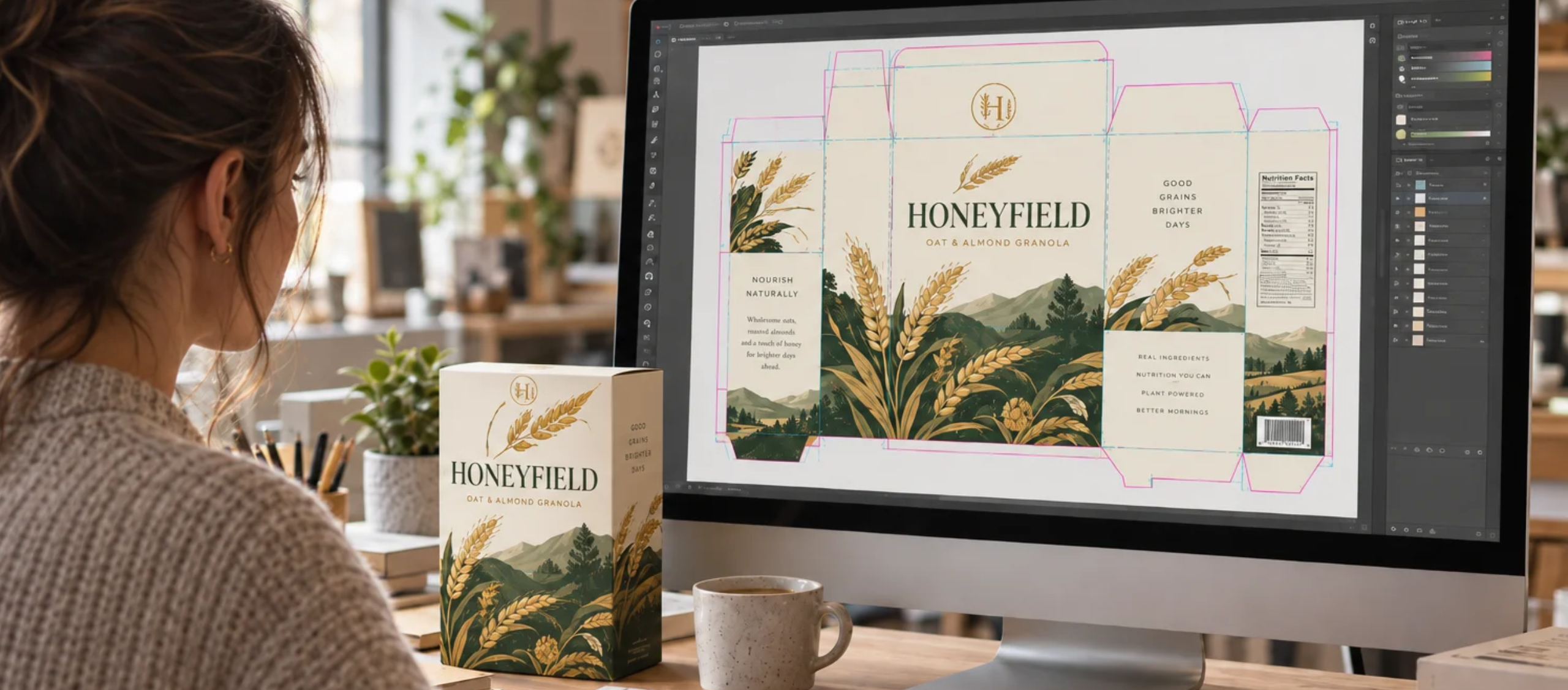
Your artwork file does not need to be production-ready. Making it production-ready is our job.
It needs to be prepress-ready — which is a different and much more achievable thing. If you’ve been told your packaging file has to arrive at the printer finished and press-ready, that’s a heavier lift than anyone should be asking of you or your designer.
Belmark doesn’t design packaging. We manufacture it, and we work from the files you and your designer provide. But we do need a designed file, built in a way our prepress team can actually work with. This is a guide to what that means, so the handoff goes smoothly and your date holds.
Where your file actually goes after you send it
Most brands picture two steps: a designer makes the artwork, a printer prints it. There’s a third step in the middle that almost nobody outside the industry knows about, and it explains every file requirement in this guide.
That step is prepress. Between design and production, someone has to take a designed file and convert it for the specific process it’s going to be printed on. Colors get separated. Images get adjusted. Elements get built out so they reproduce correctly on the press and material your packaging is actually running on.
This isn’t a Belmark quirk. It’s how the whole industry works. There are companies that do nothing but prepress, serving dozens of printers at a time, and any printer you work with will have prepress happening somewhere between your file and the press. Ours is in-house, which is part of why we can move quickly.
The practical takeaway: there is almost always something we need to do to a file before it can run. A file arriving with something for us to do isn’t a problem — that’s the expected condition. What creates delays is a file built in a way that leaves prepress nothing to work with, for example a fully AI-generated design that we go into the pros and cons of in this article.
What “prepress-ready” means
A prepress-ready file is a designed file that our team can open, take apart, and prepare for your specific packaging without having to guess or rebuild.
That’s the whole standard — not perfect and not press-ready, just constructed so the pieces are still pieces. Layers that are still layers, images that are still images, type that’s still type, and color that’s tagged in a way that means something outside of your monitor.
Everything below is just a more specific version of that idea.
Package your artwork — don’t just save it
If you take one thing from this guide, take this one. It prevents more back-and-forth than anything else on the list.
Most packaging artwork is built in Adobe Illustrator. In Illustrator, there’s a function called Package that sits right near Save — and it does something Save doesn’t. Instead of handing over one file, Package gathers your working file, every font you used, and every linked image into a single organized folder, ready to send.
The difference matters because a saved Illustrator file on its own is often incomplete. The fonts live on your designer’s computer. The images live in a folder somewhere on their drive. When that file lands with us, those pieces are missing, and we have to come back and ask for them — which usually burns a day you didn’t plan on losing.
Packaging the file sends everything at once.
Zipping the folder afterward is helpful and we’ll usually ask for it, though it isn’t strictly required. It just compresses everything into one tidy attachment.
That one habit takes care of your fonts and your images together. Images need one more decision on top of it.
Link your images instead of embedding them
When your designer places a photograph or a graphic into the artwork, they can either link it or embed it. Link it.
An embedded image is fused into the file. A linked image stays a separate file that the artwork points to — which means it also gets collected when your designer packages the artwork, and more importantly, it means we can still work with it.
Here’s why that’s not a technicality. Say your artwork includes a photograph that was built in full color, but on your particular packaging it will reproduce more cleanly prepared a different way. Our prepress team can make that call — but only if the image is still an image they can get to. Once it’s flattened into the file, that option disappears, and what you get is whatever the file already decided.
A linked image gives prepress room to prepare it correctly for your material. An embedded one takes that option off the table.
Fonts, and the licensing question everyone asks
When your designer packages a file, Illustrator throws up a dialog box about font licensing, and it gives a lot of people pause. It’s worth understanding, because it stops more handoffs than it should.
The short version: font licenses generally do not allow you to pass fonts around to anyone you feel like, but they do specifically allow you to send them to the commercial printer producing your work. That’s exactly what we are. Sending us your packaged fonts so we can reproduce your type correctly is a normal, intended use.
The alternative — outlining all your type before sending — works too, and some designers prefer it. Just know that outlined type can’t be edited afterward, so if a word changes, it goes back to your designer.
Speaking of type that can’t be edited: color is the other thing that gets locked in early, and it’s where expectations most often drift.
Tag your colors as Pantone
If your designer picks colors by eye and saves them as generic process values, nobody in the chain has a shared reference for what those colors are supposed to be. What you see on your screen isn’t what your designer sees on theirs, and neither one is what ink on your material will look like.
A Pantone number fixes that, because it points at something physical. Specifically, ask your designer to use Pantone Solid Coated — there are a lot of Pantone libraries out there, including books for paint, fabric, and other finishes, and Solid Coated is the one built for packaging production.
Why it helps you: with a Pantone number on the file, you can hold a physical swatch in your hand and see roughly what you’re going to get. We’re aiming at the same defined target you are, rather than interpreting a color that only exists on a screen. Colors won’t land identically across every material and process — no printer can honestly promise that — but they’ll land close to each other and close to your intent, which is what brand consistency actually requires.
Pantone isn’t a Belmark standard, either. It’s an independent color system, which is exactly what makes it useful: 109 means the same thing to us that it means to any other printer.
Leave yourself room at the edge
This one has a physical consequence you can hold in your hand.
Designers naturally want to use the full surface. Push artwork all the way to the edge of the shape, though, and you can run into trouble — particularly with coatings. A coating that runs too close to an edge can pull that edge back up over time. We’ve seen it on shelf: a snack line where one flavor curls at the same corner on every unit while the other flavors sit flat, because that one design pushed an element slightly too far.
So when the artwork gets laid out, keep critical elements off the edge and give the shape a little breathing room. Every printer publishes its own guidance on this, and ours errs generous on purpose. We’d rather steer you toward something that stays flat and looks the same on the last unit as it did on the first.
If you want something right at the edge, we’ll tell you the tradeoff, and then it’s your call. A design that works comfortably inside those margins from the start just skips that conversation entirely.
Margins are one way press behavior shows up in a design decision. Borders are the other, and this one catches almost everybody.
Be careful with thin borders
This is the design advice most brands have never heard, and it comes from an unexpected place: graded trading cards.
Collectors judge those cards largely on centering. A card with a thin colored border running around the outside shows every bit of drift — shift it slightly and the border goes thick on one side and thin on the other, which your eye catches instantly. Compare that to a card with a scene running off all four edges. Those look right every time, even though they vary just as much, because there’s no reference line to measure against.
Printing has a small amount of natural movement in it. The material moves through the press under tension, and there’s always a slight variance from one unit to the next. That’s normal, and it’s built into how everything on a shelf gets made.
So a thin, even border around the outside of your package is the design choice most likely to make that ordinary variance visible to a shopper. If you love the look, we can absolutely do it — just go a little thicker with it, so a small shift doesn’t read as a mistake. And if you’re weighing a bordered layout against one that bleeds off the edge, now you know what you’re trading.
Worth mentioning too: a design can behave differently as your volumes grow. If you’re starting small but expect to scale, that’s a useful thing to raise with us early, while the design is still moving.
Build on the template, not around it
Everything above assumes your designer is working on top of the right shape — and that shape comes from us.
A template gives your designer the exact dimensions of your package, where the edges fall, how much room to leave, and which areas need to stay clear. They build the artwork inside those boundaries, and that one thing does more than anything else to determine whether a file sails through prepress or bounces back.
The order matters: get the template first, then design on it. Designing something you love and then trying to force it onto a shape it doesn’t fit is where most rebuilds come from.
We cover this in more detail in our guide to what a dieline is and why your printer needs one — worth reading before your designer starts, not after. And once the file is built, the rest of the list belongs to us.
What we handle from here
Once a prepress-ready file reaches us, this part is ours:
- Color separations. Prepress prepares and adjusts separations for the specific press and material your packaging is running on, working toward the intent your Pantone callouts define — so what leaves the press is as close to your reference as that material allows.
- Nutrition Facts panels. Prepress sets these to the required format from the data you provide, so nobody on your side has to chase the current panel rules.
- Barcodes. Also set to spec, and verified for scan quality before anything runs.
- Templates and dielines. We provide the template your designer builds on, drawn from tens of thousands we’ve already established — which usually means your designer can start right away rather than waiting on a drawing.
- The production build itself. Prepress handles trapping, registration, and everything else that turns a designed file into something a press can reproduce.
You’re not expected to know any of this. You’re expected to send us a well-built designed file — and if you’re not sure whether yours qualifies, that’s a five-minute conversation, not a project.
The short version
Hand this list to your designer:
- Build on the template we provide.
- Package the file in Illustrator rather than just saving it — fonts and links included.
- Keep images linked, not embedded.
- Tag colors as Pantone Solid Coated.
- Keep critical elements off the very edge.
- Go thicker rather than thinner on any outside border.
- Send the Nutrition Facts data and barcode information as data — prepress sets those to spec.
- Zip it and send it over.
Frequently asked questions
Where Belmark fits
We’ve been manufacturing packaging since 1977, and in that time the tools designers use have changed completely. What hasn’t changed is the handoff — a good designed file, built on the right template, and a prepress team that knows what to do with it.
Belmark makes pressure sensitive labels, flexible packaging, and folding cartons, so as your line grows across formats, you’re working with one team that already knows your products and your colors. There are no order minimums, which means you can bring a new SKU to market without committing to volume you don’t need yet. And because we’re built around speed-to-market, the day your file arrives in good shape is usually the day it starts moving.
Send us your file, or send us your designer’s questions before they start building. Either way, we’ll tell you what it needs, and we stay with you from there through production and the next SKU after that. We’d much rather have that conversation early than reroute your artwork a week before your co-manufacturer needs material.
Share This Story, Choose Your Platform!
Ready to get started?
Ready to get started?
Call 920.280.1282 or fill out this form and you’ll be in touch with a packaging expert in under 24 hours.
Call 920.280.1282 or fill out this form and you’ll be in touch with a packaging expert in under 24 hours.